How to boost WordPress security and prevent downtime
Most WordPress sites are hacked for boring reasons, usually an out of date plugin or a password nobody changed. Here is how to close those gaps.
 Talk to us
WordPress 7.1.2 fixes one critical vulnerability that can end in remote code execution. Here is what it changes, how to confirm your own site is patched, and what an automatic update does not cover.
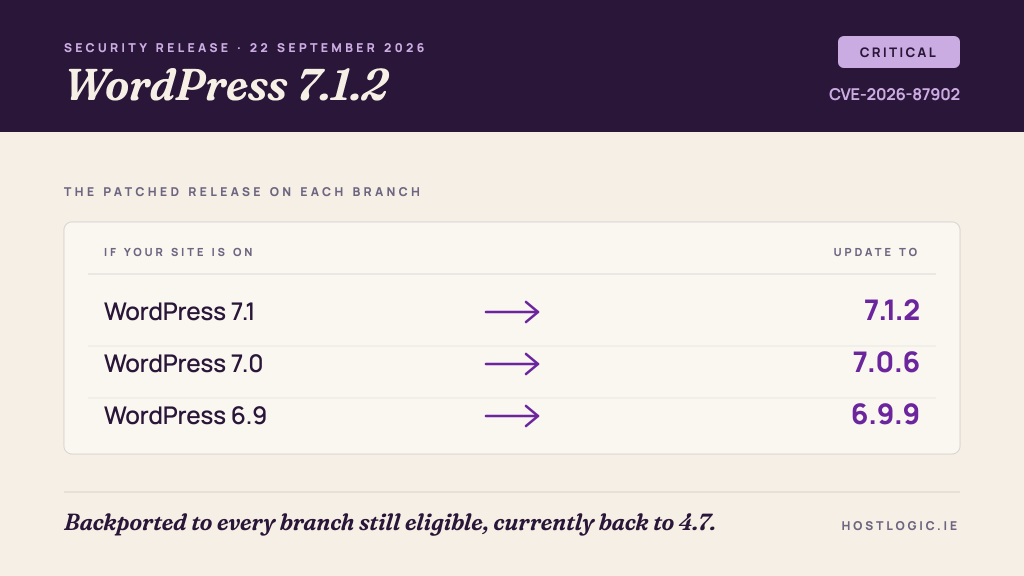
WordPress 7.1.2 was released on 22 September 2026. It is a security release, and it carries a single fix, for one vulnerability rated critical.
The flaw lets an unauthenticated attacker influence which PHP file WordPress includes when it resolves a page template, and point that resolution at a readable file outside the active theme directories. Where the server environment and the active theme both meet certain conditions, that can end in remote code execution.
There is nothing to weigh up here. If a site you are responsible for is not on 7.1.2, or on the patched release of whichever older branch it runs, it should be updated today.
The rest of this post covers what the fix addresses, how to confirm your own version in about a minute, and why an update that should have arrived on its own sometimes does not.
One thing. There are no maintenance fixes bundled in, which is itself worth noticing, because the release exists to move a single patch as quickly as possible.
WordPress decides which template file to load for a given page by working through a defined order of candidate files inside the active theme. The vulnerability allows that resolution to be steered, without any login, at a readable PHP file that sits outside those theme directories. Including a PHP file executes it, so if an attacker can also get a file of their choosing onto the server, or find one already there that does something useful to them, the result is code running under your site.
The conditions are the important qualifier. Both the server environment and the active theme have to meet particular pre-conditions for the chain to complete. WordPress has not published the detail of those pre-conditions, which is the correct decision while sites are still updating.
The vulnerability was reported by Robert Ressl through responsible disclosure and is tracked as CVE-2026-87902 / GHSA-7hp8-65ch-5whp. The release was led by John Blackbourn, with twenty-four contributors named in the announcement on WordPress.org.
Unauthenticated, critical severity, and a plausible path to remote code execution is about as high as the scale goes for a WordPress core issue. It needs no account, no privilege and no interaction from anyone on your side.
The pre-conditions do narrow it, and most sites will not be a complete match. That is a reason to be calm about it, and it is not a reason to leave the update. Very few site owners can say with confidence what their server environment and their theme do at that level of detail, and a public advisory is read by everyone, including people who scan at scale for the sites where the conditions do line up.
Treat it the way you would treat a lock that may or may not be faulty on a door you cannot see. The check costs a minute and the update costs nothing.
The fix was backported to every branch still eligible to receive security fixes, which currently runs back to 4.7. So an older site does not have to jump to 7.1 to get the patch.
It is worth being straight about what a backport does and does not do for you. It closes this one vulnerability on your branch. It does not make an old branch supported. WordPress actively supports only the most recent version, and a site sitting several branches back is carrying every other accumulated risk that the newer releases have already dealt with. A backport buys you time to plan the upgrade properly. It is not the upgrade.
Log in and look at the dashboard. The At a Glance panel on the dashboard home names the version directly, and Dashboard then Updates will tell you whether core is current or offer you the update.
If you work at the command line, wp core version returns it in a single read, and that is the answer to trust above any other.
What will not give you a reliable answer is looking at the public page source for the generator meta tag. Plenty of hosts and security configurations strip that tag on purpose, our own included, so its absence tells you nothing and a stale value can tell you something wrong. Online version checkers that work from the same public markers inherit the same problem. Read the version from inside the site.
Probably, and you should still confirm it rather than assume it.
WordPress applies minor and security releases automatically by default, and on any site that supports automatic background updates the process for 7.1.2 will have started on its own. That default is also easy to lose, often without anyone intending to.
wp-config.php, usually AUTOMATIC_UPDATER_DISABLED or a restrictive WP_AUTO_UPDATE_CORE value.None of these announce themselves. A site can look completely healthy from the front end while core has not moved in a year, and the only way to know is to read the version.
Every WordPress site on our own hosting was read individually on the day of the release, one site at a time rather than a sample, and every one of them was already on 7.1.2. Nothing needed remediation and no client had to do anything.
That is what a core security release should look like on managed hosting, and it is worth saying plainly what it does not cover. Automatic core patching covers core. A site can be current on WordPress itself and still be carrying an unpatched plugin, which is where the large majority of WordPress compromises actually begin. Our own approach to keeping sites patched treats core as the easy half of the job.
Read the version on every site you are responsible for, including the ones nobody has logged into for a year, and including staging copies. A neglected staging site on a public URL is a real way in.
Update anything that is behind, to 7.1.2 on the current branch or to the patched release of the branch it is on. Take a backup first, as you would with any update.
If a site did not update itself, find out why before you move on. The reason it missed this release is the reason it will miss the next one, and the next one may not come with a month of warning.
If keeping track of this across a portfolio of sites is the part that does not happen, that is the thing to fix rather than any individual update. It is the core of what WordPress management includes and what it costs, and it is what every one of our care plans is built around.
Get a free HostLogic site audit covering Core Web Vitals, security posture, infrastructure and a maintenance gap analysis. Written report within 3 working days. No obligation, no sales pitch.